Gold Circles with Blue Watercolor: A Designer's Toolkit for Brand Elevation
Understanding the Visual Character of This Design Set
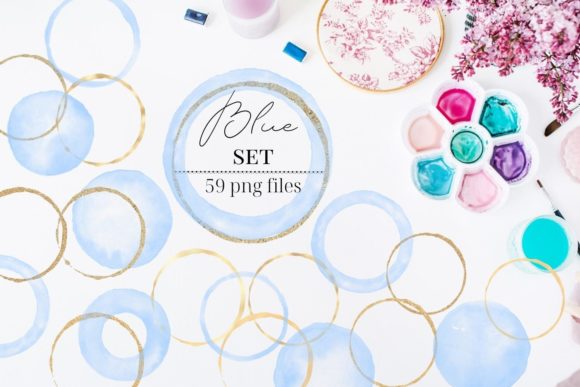
When you first open the Gold Circles with Blue Watercolor collection, you'll notice something distinct about its personality. This isn't just another set of generic design elements floating around the internet. The gold circles carry a warmth that feels luxurious without being ostentatious, while the blue watercolor components bring an organic, handcrafted quality that softens any composition. Together, they create a visual language that speaks to both sophistication and approachability.
The collection includes 15 watercolor circles, 15 strokes, 15 cloud shapes brushes, and 17 gold round circles. Each element is sized at 8" x 8" or larger, delivered as PNG files at 300 dpi with transparent backgrounds. This format choice matters more than you might think. Transparent PNGs give you flexibility to layer these elements over any background color, pattern, or image without worrying about awkward white boxes or mismatched edges. The 300 dpi resolution ensures your designs stay crisp whether you're working on digital screens or preparing files for professional printing.
What makes this particular combination work so well is the contrast between the metallic gold and the fluid blue watercolor. Gold suggests value, achievement, and premium quality. Blue watercolor evokes creativity, calm, and artistic expression. When you combine these two visual cues, you get design elements that feel elevated yet accessible—exactly the kind of balance that resonates with modern audiences who appreciate authenticity alongside professionalism.
Where These Design Elements Shine Brightest
Think about the projects where you need to make an immediate visual impact without resorting to overused stock imagery or predictable color palettes. Social media graphics come to mind first. Whether you're creating Instagram story backgrounds, Pinterest pins, or Facebook cover images, these gold and blue watercolor elements add texture and depth that flat colors simply cannot achieve. A single gold circle placed strategically behind a text overlay can transform a basic announcement into something worth pausing to read.
For entrepreneurs and small business owners developing their brand identity, this set offers genuine versatility. The gold circles work beautifully as framing devices for logos, badge-style elements for product labels, or accent marks on business cards and letterheads. The blue watercolor strokes and cloud shapes add personality to packaging design, particularly for brands in wellness, beauty, artisan goods, or creative services. If you're building a brand that needs to communicate both quality and warmth, these elements bridge that gap naturally.
Publishers and content creators will find practical applications across editorial design projects. Magazine layouts, blog headers, digital newsletters, and e-book covers all benefit from the visual interest these elements provide. The watercolor cloud shapes work particularly well as subtle background textures behind pull quotes or chapter headings. Meanwhile, the gold circles serve as elegant bullet points or section dividers that guide readers through content without feeling heavy-handed.
Crafters and hobbyists shouldn't overlook this collection either. The PNG format makes these elements compatible with most design software, from Adobe Creative Suite to Canva to Procreate. You can incorporate them into wedding invitations, greeting cards, scrapbook layouts, or custom wall art. The 8" x 8" sizing at 300 dpi gives you plenty of resolution to work with, even if you scale elements up slightly for larger print projects.
Making Smart Design Decisions with Watercolor Assets
Here's something worth considering before you start dropping gold circles onto every project in your queue. Design elements like these work best when they support your message rather than compete with it. A gold circle behind a headline draws the eye and creates hierarchy. Fifteen gold circles scattered across a single layout create visual noise. Restraint matters, especially when you're working with elements that carry as much visual weight as metallic gold.
Font pairing becomes an important consideration when incorporating watercolor and gold elements into your designs. Because these assets have a distinctly artistic, somewhat decorative quality, they tend to pair better with clean, straightforward typefaces. A modern sans serif font or a simple serif font lets the watercolor elements remain the star of the show. Script fonts and handwritten fonts can work too, but you'll want to be selective—too many ornamental details competing for attention makes layouts feel cluttered rather than curated.
Color coordination deserves attention as well. The blue watercolor elements in this set lean toward medium-to-deep blue tones. If you're building a broader color palette around these assets, consider complementary warm neutrals like cream, soft gray, or warm white for backgrounds. Rich navy or deep teal can create sophisticated tonal depth. Avoid pairing these elements with competing bright colors that might clash with the gold's warm undertones or muddy the blue watercolor's clarity.
Testing your designs across different contexts before finalizing them saves headaches later. What looks stunning on your desktop monitor might lose detail on a mobile phone screen. A design that pops beautifully against a white background might disappear against a dark one. Since these elements come with transparent backgrounds, you have the freedom to experiment. Try them against various backdrop colors and at different sizes to see how they perform in realistic viewing conditions.
Practical Tips for Working with This Collection
Start by organizing the files in a way that makes sense for your workflow. Create separate folders for the watercolor circles, strokes, cloud shapes, and gold circles. Labeling them clearly now saves you from scrolling through dozens of similarly named files later when you're on a deadline and need a specific element quickly.
When incorporating these design assets into client work or commercial projects, keep your licensing knowledge current. Understanding the terms of use for any design resource you purchase protects both you and your clients. Most premium design element sets like this one allow commercial use, but specifics can vary. Review the license details included with your purchase to ensure your intended application falls within the permitted uses.
Layering techniques can dramatically expand what you accomplish with these elements. Try placing a blue watercolor circle at reduced opacity behind a gold circle to create a shadow effect. Combine multiple watercolor strokes to build custom background textures. Adjust the opacity of gold elements to create a more subtle shimmer effect for projects where full-intensity gold feels too bold. These small adjustments transform a set of 62 individual elements into hundreds of possible combinations.
For web design applications, consider file size optimization. While the 300 dpi PNGs are perfect for print work, web projects benefit from optimized versions that load quickly without sacrificing visible quality. Save web-specific versions at 72 dpi and appropriate pixel dimensions for your layout needs.
The Gold Circles with Blue Watercolor collection represents a practical investment for anyone who regularly creates visual content. Whether you're building a brand identity from scratch, refreshing existing marketing materials, or simply want to add professional polish to your creative projects, having quality design elements on hand streamlines your workflow and elevates your output. These aren't just decorative assets—they're tools that help you communicate more effectively with your audience.
Join the newsletter at bit.ly/AnetaDesignStore to receive weekly freebies and stay updated on new design resources from Aneta & Filip.